<?xml version="1.0" encoding="utf-8"?><feed xmlns="http://www.w3.org/2005/Atom" ><generator uri="https://jekyllrb.com/" version="3.10.0">Jekyll</generator><link href="https://www.quaxio.com/feed.xml" rel="self" type="application/atom+xml" /><link href="https://www.quaxio.com/" rel="alternate" type="text/html" /><updated>2026-05-07T20:49:22+00:00</updated><id>https://www.quaxio.com/feed.xml</id><title type="html">Alok Menghrajani</title><subtitle>Alok Menghrajani&apos;s Blog</subtitle><entry><title type="html">Center-ish</title><link href="https://www.quaxio.com/center-ish/" rel="alternate" type="text/html" title="Center-ish" /><published>2026-05-06T00:00:00+00:00</published><updated>2026-05-06T00:00:00+00:00</updated><id>https://www.quaxio.com/centerish</id><content type="html" xml:base="https://www.quaxio.com/center-ish/"><![CDATA[<p><a href="/centerish">Center-ish</a> is an experiment around vertically centering content on a webpage, in an incorrect manner.</p>

<p>The result of my experiment is a collection of 50 cursed ways to center content. Some of the methods I explore do
actually work. You might even encounter them in the wild. Thankfully, most methods are just for fun, enjoy!</p>

<p>It used to be a running joke that vertical alignment in css was challenging. Thankfully, css has evolved and the various
new layout options have addressed this gap.</p>

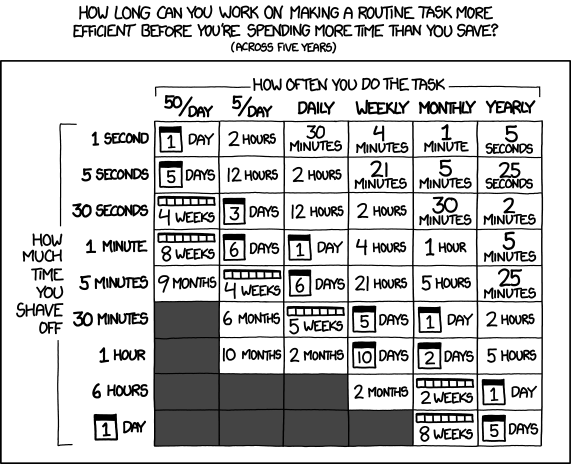
<p><img src="/files/2026/center-ish/css_joke.png" alt="xkcd-inspired joke" />
<small>(a joke about css based on <a href="https://xkcd.com/1168/">https://xkcd.com/1168/</a>)</small></p>]]></content><author><name></name></author><category term="css" /><category term="art" /><category term="humour" /><summary type="html"><![CDATA[Center-ish is an experiment around vertically centering content on a webpage, in an incorrect manner.]]></summary></entry><entry><title type="html">Kombom</title><link href="https://www.quaxio.com/building-kombom/" rel="alternate" type="text/html" title="Kombom" /><published>2026-05-01T00:00:00+00:00</published><updated>2026-05-01T00:00:00+00:00</updated><id>https://www.quaxio.com/kombom</id><content type="html" xml:base="https://www.quaxio.com/building-kombom/"><![CDATA[<p><a href="/kombom">Kombom</a> is a two-player web game I built using Claude Code. The game
allows two humans to play or one human vs a computer. The computer player
comes in three difficulty levels. This game might keep kids busy at places such
as restaurants or when waiting in a line.</p>

<p>I let Claude Code implement everything: the UI, the computer player, the
undo mechanism, etc. The whole process took about a day of work.</p>

<p>The initial code I got had lots of features I had never asked for! I felt these
distracted from the core game. The initial game wasn’t responsive
(and the final result still isn’t 100% perfect on mobile devices). Getting three
different and distinct computer players took some effort.</p>

<p>Overall I enjoyed the experience and look forward to improving my ability to
leverage such tools. I feel I’m experiencing a huge technological revolution
for at least the 4th time in my lifetime: the first time was the adoption of
computing (albeit I was a tad too young to actively participate). The second
revolution was the adoption of the Internet and the web. The third revolution
was smart phones. And now this.</p>]]></content><author><name></name></author><category term="web" /><category term="game" /><category term="developer notes" /><summary type="html"><![CDATA[Kombom is a two-player web game I built using Claude Code. The game allows two humans to play or one human vs a computer. The computer player comes in three difficulty levels. This game might keep kids busy at places such as restaurants or when waiting in a line.]]></summary></entry><entry><title type="html">Paged Out! #8</title><link href="https://www.quaxio.com/pagedout_issue8/" rel="alternate" type="text/html" title="Paged Out! #8" /><published>2026-02-26T00:00:00+00:00</published><updated>2026-02-26T00:00:00+00:00</updated><id>https://www.quaxio.com/paged-out</id><content type="html" xml:base="https://www.quaxio.com/pagedout_issue8/"><![CDATA[<p><a href="/files/2026/pagedout/PagedOut_008.pdf">Paged Out! #8</a> is out. Once again, I’m very
grateful to have had the opportunity to write an article. My article is
about sharing thoughts related to plausible deniability in the context of cryptographic
systems. To me, deniability when handling large amounts of data remains a hard operational
security problem. Coming up with novel solutions could help free speaach in
specific situations.</p>

<p>My article in on page 32, but do read the entire ezine from cover to cover!</p>]]></content><author><name></name></author><category term="ezine" /><category term="pagedout!" /><category term="cryptography" /><summary type="html"><![CDATA[Paged Out! #8 is out. Once again, I’m very grateful to have had the opportunity to write an article. My article is about sharing thoughts related to plausible deniability in the context of cryptographic systems. To me, deniability when handling large amounts of data remains a hard operational security problem. Coming up with novel solutions could help free speaach in specific situations.]]></summary></entry><entry><title type="html">Paged Out! #7</title><link href="https://www.quaxio.com/pagedout_issue7/" rel="alternate" type="text/html" title="Paged Out! #7" /><published>2025-10-04T00:00:00+00:00</published><updated>2025-10-04T00:00:00+00:00</updated><id>https://www.quaxio.com/paged_out</id><content type="html" xml:base="https://www.quaxio.com/pagedout_issue7/"><![CDATA[<p><a href="/files/2025/pagedout/PagedOut_007.pdf">Paged Out! #7</a> is out. I
  am grateful to have been able to write an article about exhaustively testing
  software by iterating over every possible floating point number. My article
  in on page 42, but do read the ezine from cover to cover!</p>]]></content><author><name></name></author><category term="ezine" /><category term="pagedout!" /><category term="float" /><summary type="html"><![CDATA[Paged Out! #7 is out. I am grateful to have been able to write an article about exhaustively testing software by iterating over every possible floating point number. My article in on page 42, but do read the ezine from cover to cover!]]></summary></entry><entry><title type="html">Compilation abuse: playing Bad Apple using gcc warnings</title><link href="https://www.quaxio.com/compilation-abuse/" rel="alternate" type="text/html" title="Compilation abuse: playing Bad Apple using gcc warnings" /><published>2025-09-07T00:00:00+00:00</published><updated>2025-09-07T00:00:00+00:00</updated><id>https://www.quaxio.com/compilation-abuse</id><content type="html" xml:base="https://www.quaxio.com/compilation-abuse/"><![CDATA[<p>I abused gcc’s warnings to render Bad Apple.</p>

<p><a href="https://www.youtube.com/watch?v=_lHo-d5cURM">Video</a></p>

<p><a href="https://github.com/alokmenghrajani/gcc-bad-apple">Source code and explanation</a></p>]]></content><author><name></name></author><category term="hack" /><category term="compiler" /><category term="gcc" /><summary type="html"><![CDATA[I abused gcc’s warnings to render Bad Apple.]]></summary></entry><entry><title type="html">On Building Crossabble</title><link href="https://www.quaxio.com/building-crossabble/" rel="alternate" type="text/html" title="On Building Crossabble" /><published>2025-07-11T00:00:00+00:00</published><updated>2025-07-11T00:00:00+00:00</updated><id>https://www.quaxio.com/building-crossabble</id><content type="html" xml:base="https://www.quaxio.com/building-crossabble/"><![CDATA[<p>I recently built <a href="https://crossabble.com/">crossabble</a>, a free web word puzzle
game. I was surprised by the number of edge cases I had to take into account.
This post is based on my developer log.</p>

<p>Crossabble is a browser game: html, css, and javascript. The javascript
part is quite minimal and trivial – I spent most of my time on css,
polishing the game’s look and feel. I’m primarily a backend software
engineer – when working on frontends, I’m punching a little above my
weight.</p>

<p>My goal for Crossabble is to have a game that works well across all common
modern web environments: laptops, tablets, phones, in landscape and portrait
mode, etc. I own many devices, it however takes a lot of discipline to test each
and every change with each and every device, browser, and orientation
combination. Backend engineering seems simpler in this respect.</p>

<h2 id="virtual-keyboard">Virtual Keyboard</h2>

<p>When browsing with touch devices, most web word games re-implement a virtual
keyboard instead of using the device’s native one. Some notable examples,
New York Times’ <a href="https://www.nytimes.com/games/wordle/index.html">Wordle</a>:</p>

<p><img src="/files/2025/building-crossabble/wordle_virtual_keyboard.png" style="width: 50%; border: 1px solid black" /></p>

<p>New York Times’ <a href="https://www.nytimes.com/crosswords/game/mini">Mini Crossword</a>:</p>

<p><img src="/files/2025/building-crossabble/mini_crossword_virtual_keyboard.png" style="width: 50%; border: 1px solid black" /></p>

<p>The Atlantic’s <a href="https://www.theatlantic.com/games/bracket-city/">Bracket City</a>:</p>

<p><img src="/files/2025/building-crossabble/bracket_city_virtual_keyboard.png" style="width: 50%; border: 1px solid black" /></p>

<p>Some of these implementations are however buggy. For example, Wordle mishandles
touch events and records the wrong letter when quickly typing adjacent letters,
an issue which was brought up on <a href="https://www.reddit.com/r/wordle/comments/1eddr06/does_anyone_elses_wordle_keyboard_have_glitches/">r/wordle</a> about a year ago:</p>

<p><img src="/files/2025/building-crossabble/wordle_buggy_event_handling.gif" style="width: 50%; border: 1px solid black" /></p>

<p>Besides potential bugs, re-implementing the virtual keyboard has several downsides:</p>

<ul>
  <li>The keyboard layout might not match the user’s preference. There’s no browser
API to query the user’s preferred keyboard layout. It can be quite annoying for
someone used to one keyboard layout to have to type on a different layout.</li>
  <li>The color might not match the native interface.</li>
  <li>The spacing between keys might not match the native interface.</li>
  <li>The interface might not reflect features available in the native interface,
such as speech-to-text or swipe. Some of these features might be important
in terms of accessibility.</li>
  <li>Subtle other differences can make the re-implementation feel off, inferior,
or simply different.</li>
</ul>

<p>Knowing these issues, I initially attempted to use the native virtual keyboard.
There are multiple possible approaches to achieve the look and feel of
filling boxes. I tried using <a href="/files/2025/building-crossabble/one_input_per_letter.html">one input field per letter</a>
which has many hard to solve quirks. I then tried using <a href="/files/2025/building-crossabble/hidden_input_fields.html">hidden
input fields</a> with
somewhat better results.</p>

<p>I was however unhappy with the native keyboard:</p>

<ul>
  <li>The keyboard takes too much screen space. Several keys are not needed for
my game (e.g. shift, space, numbers, emojis).</li>
  <li>The user gets suggestions (even with <code>autocomplete="off"</code>). These
suggestions don’t respect the field’s <code>maxlength</code> attribute. Text
suggestions can be disabled by making the field a hidden password field with
some caveats.</li>
  <li>It’s a pain to account for the keyboard’s size (there doesn’t seem to be
any css unit similar to <code>svh</code> which takes the native virtual keyboard
size into account).</li>
</ul>

<p><img src="/files/2025/building-crossabble/native_virtual_keyboard_not_ideal.png" style="width: 50%; border: 1px solid black" /></p>

<p>Reluctantly, I re-implemented a virtual keyboard – a less buggy version than
what’s out there hopefully.</p>

<p>During these experiments, I did run into and filed a Chrome <a href="https://issues.chromium.org/issues/420460315">bug</a>
in addition to reporting that input field suggestions should perhaps take the
field maxlength into account.</p>

<h2 id="chrome-refresh-issue">Chrome refresh issue</h2>

<p>While trying to build an accurate web interface, I noticed that hitting refresh
in Chrome sometimes moves things around. I didn’t immediately realize that I
had content which was wider than the page and it was the scrollbar
position hopping around (it’s unfortunate that scrollbars are hidden by default
nowadays) and I was left confused for a bit.</p>

<p><img src="/files/2025/building-crossabble/scrollbar_weirdness.gif" style="width: 50%; border: 1px solid black" /></p>

<p><a href="/files/2025/building-crossabble/scroll_position_weirdness.html">Try it for yourself</a></p>

<h2 id="undesirable-text-nodes">Undesirable text nodes</h2>

<p><a href="/files/2025/building-crossabble/text_nodes.html">This file</a> displays 9 squares
which should be contained inside the green box. Depending on the window size,
the squares however overflow:</p>

<p><img src="/files/2025/building-crossabble/text_nodes.gif" style="width: 50%; border: 1px solid black" /></p>

<p>The overflow is caused by empty nodes taking up height. The empty nodes were
added by the auto-formatter – you would think that a code formatter wouldn’t
have any side effects!</p>

<p>I found a couple ways to work around this issue:</p>

<ul>
  <li><a href="/files/2025/building-crossabble/text_nodes_no_autoformatter.html">Don’t auto-format the file on save</a></li>
  <li><a href="/files/2025/building-crossabble/text_nodes_javascript.html">Use some javascript to remove empty text nodes</a></li>
  <li><a href="/files/2025/building-crossabble/text_nodes_font_size_zero.html">Set the font-size to 0</a></li>
</ul>

<h2 id="allocating-enough-space-for-clues">Allocating enough space for clues</h2>

<p>The New York Times’ Mini Crossword grid shrinks when the clue is too long. This
is caused by not allocating enough space for the clue area:</p>

<p><img src="/files/2025/building-crossabble/mini_crossword_resize.gif" style="width: 50%; border: 1px solid black" /></p>

<p>I avoid this situation by using a clever trick with css grids. Several <code>&lt;div&gt;</code>
elements can be assigned the same grid coordinates, causing them to overlap.
Visibility or opacity can then be used to pick which clue is shown.</p>

<p><img src="/files/2025/building-crossabble/clues.gif" style="width: 50%; border: 1px solid black" /></p>

<p><a href="/files/2025/building-crossabble/clues.html">Try it for yourself!</a></p>

<h2 id="notifying-users-and-dau-nan">Notifying users and DAU NaN</h2>

<p>Given that my puzzle is released on a weekly basis, some form of notification
might be useful to remind people to come back and play. I however believe
the web is a better place when sites don’t track their users. So I didn’t
want to collect people’s email addresses or require them to create an account.</p>

<p>Instead, I created a simple way for users to add a calendar reminder to their
own calendar. They can then delete the reminder whenever they wish. Users can
also subscribe to the <a href="http://crossabble.com/feed.xml">RSS/Atom feed</a>, although
I’m not sure if anyone is still using RSS/Atom feeds.</p>

<p>I call my philosophy of not tracking users “DAU NaN”. I know a small minority of
other people share this philosophy about online activity tracking.</p>

<p>Instead of showing ads, users can support me via a <a href="https://buymeacoffee.com/crossabble">buymeacoffee</a> button.</p>

<h2 id="infrastructure">Infrastructure</h2>

<p>To wrap up these notes, I’ll briefly cover the infrastructure. In order to
minimize costs and maximize availability, the site is generated using a custom
script, akin to a static site generator. The code is hosted in a private
GitHub repo, but can easily be relocated anywhere. The static site is served by
Cloudflare, and again, I can easily relocate to some other service if needed.</p>

<p>I have the ability to draft puzzles ahead of time, to be released on a specific
schedule – a Cloudflare worker regenerates all the static pages on a weekly
basis.</p>

<p>Crafting puzzles is the most time consuming part of this project – which is
fine as long as I’m enjoying crafting puzzles. I do have a helper tool
to help me with this process and plan to expand this tool over time.</p>

<p>That’s it for now, do share with me if you think I could have done things
differently or if you see any areas for improving the game!</p>]]></content><author><name></name></author><category term="web" /><category term="developer notes" /><summary type="html"><![CDATA[I recently built crossabble, a free web word puzzle game. I was surprised by the number of edge cases I had to take into account. This post is based on my developer log.]]></summary></entry><entry><title type="html">Rounding to nearest half mark</title><link href="https://www.quaxio.com/rounding_to_nearest_half_mark/" rel="alternate" type="text/html" title="Rounding to nearest half mark" /><published>2025-06-01T00:00:00+00:00</published><updated>2025-06-01T00:00:00+00:00</updated><id>https://www.quaxio.com/rounding_to_nearest_half_mark</id><content type="html" xml:base="https://www.quaxio.com/rounding_to_nearest_half_mark/"><![CDATA[<p>There are several common ways to round numbers. This post explains some of these rounding methods, what to do when a rounding method isn’t available, and an analysis of rounding behavior across different version of Java.</p>

<p>Common rounding methods include floor (round down), ceil (round up), truncate (round towards zero), banker’s rounding, etc. Usually you can use all these different rounding methods out of the box.</p>

<p>Example: floor rounds numbers down. This means <code class="language-plaintext highlighter-rouge">floor(2.7)</code> is <code class="language-plaintext highlighter-rouge">2</code> and <code class="language-plaintext highlighter-rouge">floor(-2.7)</code> is <code class="language-plaintext highlighter-rouge">-3</code>.</p>

<p>You might come across cases where rounding towards the nearest
half mark (i.e. rounding towards the nearest 0.5) is missing. As a work around, you can double the value and then half the result of rounding. I.e. <code class="language-plaintext highlighter-rouge">round_to_closest_half(x) = round(x*2)/2</code>.</p>

<p>It is however important to keep in mind that floating point computations have tricky edge cases. A naive rounding implementation can therefore hide bugs.</p>

<p>For example, Java 6 <a href="https://github.com/openjdk/jdk6/blob/3e49aa876353eaa215cde71eb21acc9b7f9872a0/jdk/src/share/classes/java/lang/Math.java#L678">implemented rounding</a> as <code class="language-plaintext highlighter-rouge">floor(x+0.5)</code>, which causes it to return an <a href="https://bugs.java.com/bugdatabase/view_bug.do?bug_id=6430675">incorrect value</a> for <code class="language-plaintext highlighter-rouge">0.49999999999999994</code>. The reason is that
adding <code class="language-plaintext highlighter-rouge">0.5</code> to <code class="language-plaintext highlighter-rouge">0.49999999999999994</code> cannot be accurately represented as a floating point. The addition is approximate and the result is rounded to <code class="language-plaintext highlighter-rouge">1</code>. Perhaps they should have implemented rounding as <code class="language-plaintext highlighter-rouge">floor(x-0.5)+1</code>?</p>

<p>Java 7 <a href="https://github.com/openjdk/jdk7/commit/b4d4e3bed48fae16f01345fc624715588d112697">changed the rounding logic</a> and <a href="https://docs.oracle.com/javase/7/docs/api/java/lang/Math.html#round">updated the documentation accordingly</a></p>

<p><a href="https://mail.openjdk.org/pipermail/core-libs-dev/2013-January/014129.html">The story doesn’t end here</a> and the implementation of rounding had to be <a href="https://github.com/openjdk/jdk9/blob/master/jdk/src/java.base/share/classes/java/lang/Math.java#L739">changed again</a>.</p>

<p>One way to discover such edge cases is to re-implement the floating point library as a tiny float (e.g. with 8-bit instead of 64-bit) and then check every possible value, something I discuss in a <a href="/pagedout_issue7/">PagedOut! #7</a> article.</p>]]></content><author><name></name></author><category term="math" /><category term="float" /><category term="rounding" /><summary type="html"><![CDATA[There are several common ways to round numbers. This post explains some of these rounding methods, what to do when a rounding method isn’t available, and an analysis of rounding behavior across different version of Java.]]></summary></entry><entry><title type="html">Heart of Love JavaScript port</title><link href="https://www.quaxio.com/led-heart-of-love/" rel="alternate" type="text/html" title="Heart of Love JavaScript port" /><published>2024-06-18T00:00:00+00:00</published><updated>2024-06-18T00:00:00+00:00</updated><id>https://www.quaxio.com/heart-of-love</id><content type="html" xml:base="https://www.quaxio.com/led-heart-of-love/"><![CDATA[<p>I once purchased an <a href="https://www.kitsrus.com/k136.html">electronics kit</a>
from Kitsrus called Heart of Love (kit 136) as a Valentine Day present. 15 years
later, the Heart of Love continues to blink its LEDs in fun patterns. The kit
includes <a href="https://github.com/alokmenghrajani/heart-of-love/blob/main/heart.c">source code</a> and <a href="https://github.com/alokmenghrajani/heart-of-love/blob/main/k136.pdf">schematic</a>. <a href="https://github.com/alokmenghrajani/heart-of-love">This repo</a> contains
a JavaScript port. Implementing this code gave me an opportunity to peek and
understand how the flashing patterns were encoded. The original source code used
an interpreter to save code space.</p>

<p>Next steps? Maybe I’ll emulate the chip (an <a href="https://en.wikipedia.org/wiki/MCS-51">Intel 8051</a>)
or build a keychain-sized clone…</p>

<h2 id="see-it-in-action">See it in action</h2>

<p>Visit <a href="https://www.quaxio.com/heart-of-love/k136.html">k136.html</a> in
your browser to see the JavaScript version of Heart of Love.</p>]]></content><author><name></name></author><category term="microcontroller" /><category term="javascript" /><summary type="html"><![CDATA[I once purchased an electronics kit from Kitsrus called Heart of Love (kit 136) as a Valentine Day present. 15 years later, the Heart of Love continues to blink its LEDs in fun patterns. The kit includes source code and schematic. This repo contains a JavaScript port. Implementing this code gave me an opportunity to peek and understand how the flashing patterns were encoded. The original source code used an interpreter to save code space.]]></summary></entry><entry><title type="html">Paged Out! #4</title><link href="https://www.quaxio.com/pagedout_issue4/" rel="alternate" type="text/html" title="Paged Out! #4" /><published>2024-06-01T00:00:00+00:00</published><updated>2024-06-01T00:00:00+00:00</updated><id>https://www.quaxio.com/paged_out</id><content type="html" xml:base="https://www.quaxio.com/pagedout_issue4/"><![CDATA[<p><a href="/files/2024/pagedout/PagedOut_004_beta1.pdf">Paged Out! #4</a> is out
  and once again I got to write two articles. This time, my articles are about
  TypeScript's type system. The first article appears on page 37 and shows a
  program which only compiles if an array in the source code is a valid magic
  square. The second article, on page 31 is a continuation and looks at a useful
  use-case of TypeScript's advance type-system. Enjoy! All the other articles
  are great, do read the ezine from cover to cover!</p>]]></content><author><name></name></author><category term="ezine" /><category term="pagedout!" /><category term="type systems" /><category term="TypeScript" /><summary type="html"><![CDATA[Paged Out! #4 is out and once again I got to write two articles. This time, my articles are about TypeScript's type system. The first article appears on page 37 and shows a program which only compiles if an array in the source code is a valid magic square. The second article, on page 31 is a continuation and looks at a useful use-case of TypeScript's advance type-system. Enjoy! All the other articles are great, do read the ezine from cover to cover!]]></summary></entry><entry><title type="html">YCombinator logo</title><link href="https://www.quaxio.com/ycombinator_logo/" rel="alternate" type="text/html" title="YCombinator logo" /><published>2023-09-11T00:00:00+00:00</published><updated>2023-09-11T00:00:00+00:00</updated><id>https://www.quaxio.com/ycombinator_logo</id><content type="html" xml:base="https://www.quaxio.com/ycombinator_logo/"><![CDATA[<p>The newest YCombinator <a href="/files/2023/ycombinator_logo/y18.svg">logo</a> (<a href="https://news.ycombinator.com/item?id=35894326">upgraded to SVG in 2023</a>)
  looks fine on a small screen. But if you zoom or have a large and high resolution screen, you might notice an
  uneven blue border. The border is 0.375 pixels wide so you might incorrectly think that it's invisible.
  Some high density screens automatically zoom by a factor between 2.0 and 3.0 (and perhaps more in the future).
  In such cases, the tiny border becomes apparent (which is how I noticed it).</p>
<div style="background-color: #0097e4; height: 22px; padding: 2px;"><img src="/files/2023/ycombinator_logo/y18.svg" style="border: 1px white solid; border-radius: 0px; width: 18px; height: 18px; margin: 0"></div>
<div style="background-color: #0097e4; height: 220px; padding: 20px;"><img src="/files/2023/ycombinator_logo/y18.svg" style="border: 10px white solid; border-radius: 0px; width: 180px; height: 180px; margin: 0"></div>
<br>
<p>The logo can be <a href="/files/2023/ycombinator_logo/y18_fixed.svg">fixed</a> by tweaking the svg's viewBox:
<pre>&lt; ... viewBox="0 0 192 192" ...
&gt; ... viewBox="4 4 188 188" ...</pre>
</p>
<div style="background-color: #0097e4; height: 22px; padding: 2px;"><img src="/files/2023/ycombinator_logo/y18_fixed.svg" style="border: 1px white solid; border-radius: 0px; width: 18px; height: 18px; margin: 0"></div>
<div style="background-color: #0097e4; height: 220px; padding: 20px;"><img src="/files/2023/ycombinator_logo/y18_fixed.svg" style="border: 10px white solid; border-radius: 0px; width: 180px; height: 180px; margin: 0"></div>
<br>
<p>update: <a href="https://news.ycombinator.com/user?id=dang">dang</a> fixed the <a href="https://news.ycombinator.com/">news.ycombinator.com</a> logo.</p>]]></content><author><name></name></author><category term="svg" /><summary type="html"><![CDATA[The newest YCombinator logo (upgraded to SVG in 2023) looks fine on a small screen. But if you zoom or have a large and high resolution screen, you might notice an uneven blue border. The border is 0.375 pixels wide so you might incorrectly think that it's invisible. Some high density screens automatically zoom by a factor between 2.0 and 3.0 (and perhaps more in the future). In such cases, the tiny border becomes apparent (which is how I noticed it). The logo can be fixed by tweaking the svg's viewBox: &lt; ... viewBox="0 0 192 192" ... &gt; ... viewBox="4 4 188 188" ... update: dang fixed the news.ycombinator.com logo.]]></summary></entry></feed>